Live Zoom classes

From Prompt to Product: AI Skills for Builders

New: Published in the last 30 days.

Learn to use Claude, Cursor and Codex effectively, and get better results for fewer tokens.

  • AI & Data Science
  • Urdu language
  • Beginner

Batches

Upcoming (1)

Admission open

Batch 1

Admission open
Admission deadline13 Dec 2026
Dates
20 Dec 2026 – 7 Feb 2027 · 2 months
Class days
Sun · 8 weeks · 2 months
Where
Online on Zoom
Seats
100 of 100 left

Build practical AI fluency from the fundamentals. You will learn prompting techniques, AI-assisted development, spec-driven development and how to work with Claude, Cursor and Codex. You will also learn how to optimize tokens through prompt and context engineering.

Weekly schedule (8 weeks)

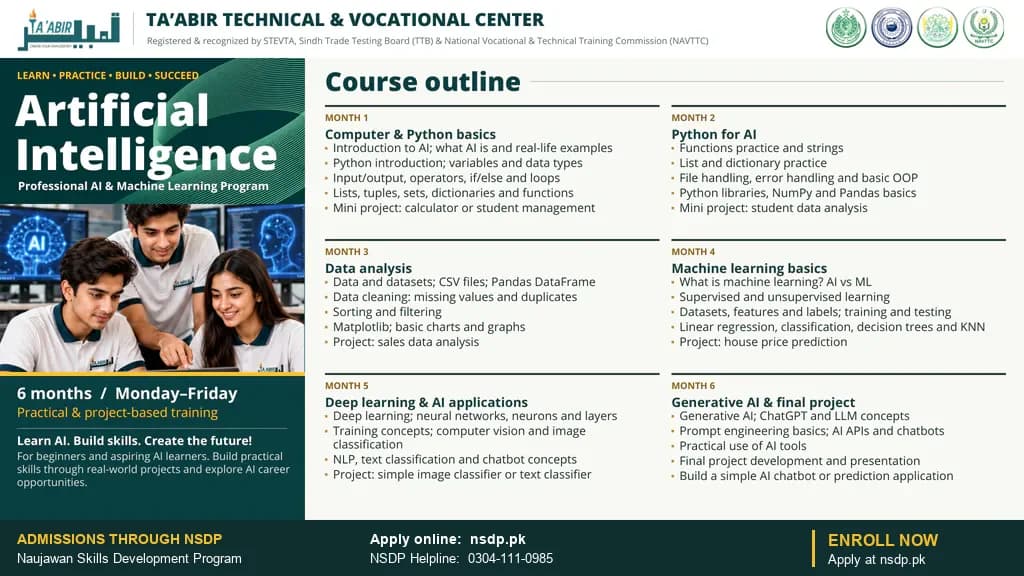
Week 1: AI Fluency Foundations: How LLMs Think, Respond & Fail

  • • Understand how modern AI models work, what they do well, where they go wrong, and how to evaluate AI-generated output with confidence. — 20 Dec 2026, 15:00–18:00

Week 2: Prompt Engineering Mastery: Get Better Results from AI

  • • Learn structured prompting, role and format control, examples, iterative refinement, and techniques for turning vague requests into reliable outputs — 27 Dec 2026, 15:00–18:00

Week 3: Context Engineering: Give AI the Right Information

  • • Learn how to select, organize, trim, and structure context so AI produces more accurate results with less noise and fewer wasted tokens. — 3 Jan 2027, 15:00–18:00

Week 4: Claude for Research, Analysis & High-Quality Knowledge Work

  • • Use Claude effectively for research, writing, planning, analysis, problem solving, documentation, and structured professional workflows. — 10 Jan 2027, 15:00–18:00

Week 5: AI-Assisted Development with Cursor: Build Faster Inside Your IDE

  • • Learn how to use Cursor to understand codebases, generate features, refactor code, debug issues, and collaborate with AI during real development work. — 17 Jan 2027, 15:00–18:00

Week 6: Codex & Coding Agents: Delegate Development Tasks to AI

  • • Learn how to give coding agents clear tasks, provide the right context, review generated changes, verify output, and safely delegate more complex development work. — 24 Jan 2027, 15:00–18:00

Week 7: Spec-Driven Development: From Idea to Working Product

  • • Turn requirements into clear specifications and use AI to plan, implement, test, and review software in a structured Prompt → Spec → Build → Verify workflow. — 31 Jan 2027, 15:00–18:00

Week 8: Token Optimization & Your Complete AI Builder Workflow

  • • Learn to reduce token usage, cost, and unnecessary context while maintaining output quality, then combine Claude, Cursor, Codex, prompting, context engineering, and spec-driven development into one re — 7 Feb 2027, 15:00–18:00

What you’ll learn

  • Explain how large language models work and where they go wrong
  • Apply core prompting techniques, including few-shot examples, role setting and structured output
  • Use step-by-step reasoning and iterative refinement to improve answers
  • Use Claude for research, writing, analysis and problem solving
  • Build and edit code with AI assistance in Cursor
  • Delegate development tasks to Codex and review its output
  • Write clear specifications and use them to drive AI-assisted development
  • Plan, test and verify AI-generated code before using it
  • Apply prompt engineering to get reliable results from AI tools
  • Apply context engineering to choose and trim the information a model sees
  • Reduce token usage and cost without losing output quality
  • Build a personal workflow for using AI tools responsibly and effectively

About this course

AI tools are now part of everyday work, but most people use them without a clear method. This course gives you a structured foundation in AI fluency: how large language models work, how to prompt them well, and how to use them to build software and other work products reliably. The course starts with the fundamentals of AI. You will learn what language models can and cannot do, why their output varies, and how to judge whether a response is trustworthy. Next, you will study prompting techniques, including clear instructions, examples, role and format control, step-by-step reasoning and iterative refinement. The core of the course is AI-assisted development. You will work hands-on with Claude, Cursor and Codex, comparing where each tool fits in a real workflow, from chat-based problem solving to editing code inside an IDE to delegating tasks to a coding agent. You will also learn spec-driven development, where you write a clear specification first and use it to guide AI to generate, test and review the implementation. The final module focuses on token optimization. You will learn prompt engineering and context engineering: how to select, structure and trim the information you give a model so you get better results at lower cost and latency. You will leave with a repeatable process you can apply to any AI tool. No prior AI experience is required. Basic computer literacy and an interest in building with AI are enough to get started.

Requirements

  • A computer running Windows, macOS or Linux
  • An internet connection
  • Access to Claude, Cursor and Codex. Some tools have free tiers; others need a paid plan or API access.
  • Basic computer literacy. No programming experience is required for the prompting modules.
  • Some familiarity with coding is helpful for the development modules.

Who this course is for

  • Professionals who want to use AI tools more effectively in their daily work
  • Developers who want to adopt AI-assisted development workflows
  • Product managers, analysts and writers who want to get reliable results from AI
  • Students and career changers building foundational AI skills
  • Teams that want a shared method for prompting and AI tool use

Your instructor

Farhaj Ahmed

AI and Mobile Development

No reviews yet1 course on NSDP

Senior iOS Engineer | iOS Architecture & AI Integration | Product-Focused Developer | iOS Educator & Trainer I’m a Senior iOS Engineer and educator with 7+ years of experience building high-performance, user-centric apps that hold 4.7+ ratings on the App Store. I also have 10+ years of teaching experience, including 7+ years as an iOS trainer, and I have helped produce 60+ native iOS developers through my courses, workshops, and YouTube content. My work centers on three areas: AI integration: I build AI features into iOS products, including an OpenAI-powered personal assistant for PureVPN’s iOS app that improved customer support efficiency and user experience. Architecture and quality: I design with clean architecture (MVVM, VIPER) and back it with rigorous unit and UI testing, so apps stay fast and easy to maintain. Monetization: I implement App Bundles and RevenueCat paywalls and build secure payment flows with Stripe, turning product improvements into revenue growth. My MBA lets me connect technical decisions to business goals. I’ve managed iOS products from concept through design, development, testing, release, and ongoing optimization, working closely with product, design, and QA teams. I currently lead iOS development at Folio3 for CXAI, shipping features for the CXApp native iOS app that enterprise organizations use to streamline core employee workflows. Teaching is part of how I work. Whether it’s a cohort, a workshop, or a video, I enjoy turning complex iOS concepts into practical skills. I’m open to connecting with product-focused teams building AI-powered mobile products. Skills Languages: Swift, Objective-C, Python Frameworks: UIKit, SwiftUI, Combine, CoreData, GraphQL, MapKit, Core Animation, Core Graphics, NSURLSession Architecture: MVVM, VIPER, Clean Architecture AI: OpenAI integration, LangChain, LangGraph, CrewAI, Phi Data, Abily Tools: RevenueCat, Stripe, Mixpanel, Xcode, Git, JIRA, Notion, Cursor, Windsurf, PyCharm, VS Code

View full profile

Frequently asked questions

Do I need prior AI experience to join?

No. The course starts from the fundamentals and is suitable for beginners who want to build practical AI skills.

Do I need programming experience?

No programming experience is required for the prompting and AI fundamentals modules. Basic coding knowledge will be helpful for the AI-assisted development sessions.

Which AI tools will we use?

The course focuses on Claude, Cursor and Codex, with practical examples showing where each tool fits into a real workflow.

Is this course only for developers?

No. It is also useful for product managers, analysts, writers, students and professionals who want to use AI more effectively in their work.

How are the live sessions structured?

Each live session is 2 hours and focuses on a specific topic through explanation, live demonstrations and practical workflows.

Will the course cover token optimization?

Yes. You will learn how to reduce unnecessary token usage while maintaining output quality, improving both efficiency and cost.

Will we build with AI during the course?

Yes. The course includes practical AI-assisted development workflows where you move from prompts and specifications toward implementation, testing and review.

Do I need paid subscriptions to all the tools?

No, some tools offer free access or limited tiers, while certain features may require a paid plan or API access. You can still learn the concepts even if you do not have every premium feature.

Is this course suitable for students and career changers?

Yes. It is designed to provide a practical foundation for people who want to build useful AI skills for study, work or a future technology career.

How long is the batch?

The recommended format is 4 weekends, with 8 live sessions and approximately 16 hours of instructor-led training.

24-hour refund policy

Try your first class with confidence.

  1. 1

    Attend your first class

    Join your first live class on Zoom and see if it suits you.

  2. 2

    Ask within 24 hours

    Not satisfied? Ask for a refund within 24 hours of the first class.

  3. 3

    Get your registration back

    Our team confirms your request and refunds your minor registration.

The same policy applies to self-paced courses (within 24 hours of your minor registration) and to live Zoom and on-campus classes (within 24 hours of the first class). Joined a live Zoom or on-campus class after its first class? Then the 24 hours count from your minor registration. To ask, press “Request a refund” on your course card in the NSDP student portal, or contact the NSDP helpline 0304-111-0985, WhatsApp 0320-8797409 or email support.department@nsdp.pk with your CNIC and PSID / challan number, or type “refund” in the NSDP Rehnuma chat. Requests after 24 hours aren’t eligible. See the cancellation & refund policy.

Student reviews

Loading reviews
Teach live on Zoom with NSDPInstructors wantedRun live online batches from home. NSDP enrols the students and funds you for every student you teach, paid to your panel every month.Become an instructor

Students also explore

Now on Google PlayDownload the NSDP Student app

Watch lessons, join live classes, take quizzes and get notified about new batches. Free on Google Play; the iPhone app is coming soon.

GET IT ONGoogle PlayComing soon on theApp Store
NSDP logo

© 2026 Naujawan Skills Development Program. All rights reserved.Recognised by the Office of the Speaker, Provincial Assembly of the Punjab · Inaugurated by the Governor of Punjab · For learners across Pakistan and overseas